


Your lab has read the paper, discussed the findings and challenged the conclusions. But six months later, can anyone remember what the room actually decided?
An intriguing post on r/AskAcademia discussed what a senior researcher would remember about the journal club from last spring: “That paper we discussed a year ago in the journal club… Then I’ll go back and find the meeting invitation in my email lol.” A newer lab member in the same thread described the other side of it: “Everyone in the lab knows the paper… I’ve read it but don’t remember anything.”
A few members might remember the paper, the presenter, or a particularly heated debate. But ask what the group concluded and the answers get harder to find.
Most journal club organisers try to keep a record so that “newcomers know about the history of the club.” The record is usually a shared doc or a group library listing the papers that were presented. That list tells you what the club read. It doesn’t necessarily tell you which findings the team accepted, what objections were raised, or how one paper changed the way the lab understood another.
That’s a missed opportunity.
A journal club shouldn’t just build a reading list. It should build a record of scientific thinking.
This article shows how Axy can help your lab run each week’s paper through a shared knowledge graph that captures the findings, connects them to previous research, and preserves the discussion behind the team’s decisions.
Over time, those individual discussions become a research resource that a new lab member can read in an afternoon.
Here’s how to make it work.
Keep Zotero. Add one graph.
Keep using your Zotero group library (or Mendeley group) for PDFs, annotations and citations. Axy isn’t another reference manager; it serves a different purpose altogether. Your team records what it concluded about a paper and how those conclusions connect to the research discussed before it.
Think of the difference this way:
- Your reference library holds what your lab reads.
- Your knowledge graph captures the relationships and claims your lab discussed.
- Your submission discussions preserve the reasoning behind the team’s decisions.
Each paper enters the graph by its DOI, once, when the club reads it. There’s no back-catalogue import to do. The graph starts on the day you start it and grows one session at a time. The goal isn’t to recreate everything your lab has ever read. It’s to start preserving what your lab learns from each discussion in every journal club session.
Set up the graph before the next session
You need one graph, owned by the organiser. For a club discussing published research, a public graph is the simplest place to start.
On a public graph, any user signed in to Axy can draft, submit, review and comment without being added as a member. The organiser retains control over what becomes part of the graph, because only graph admins can merge submissions. The Free plan includes one public graph, making it possible to run the club workflow without paying for graph access.
Public graphs can be found by any signed-in Axy user, and that’s important to consider before you start. Never put unpublished lab results or confidential research into a public graph. If your club needs privacy, a private graph with invited members needs the Pro plan, which is currently priced at $5 per person per month.
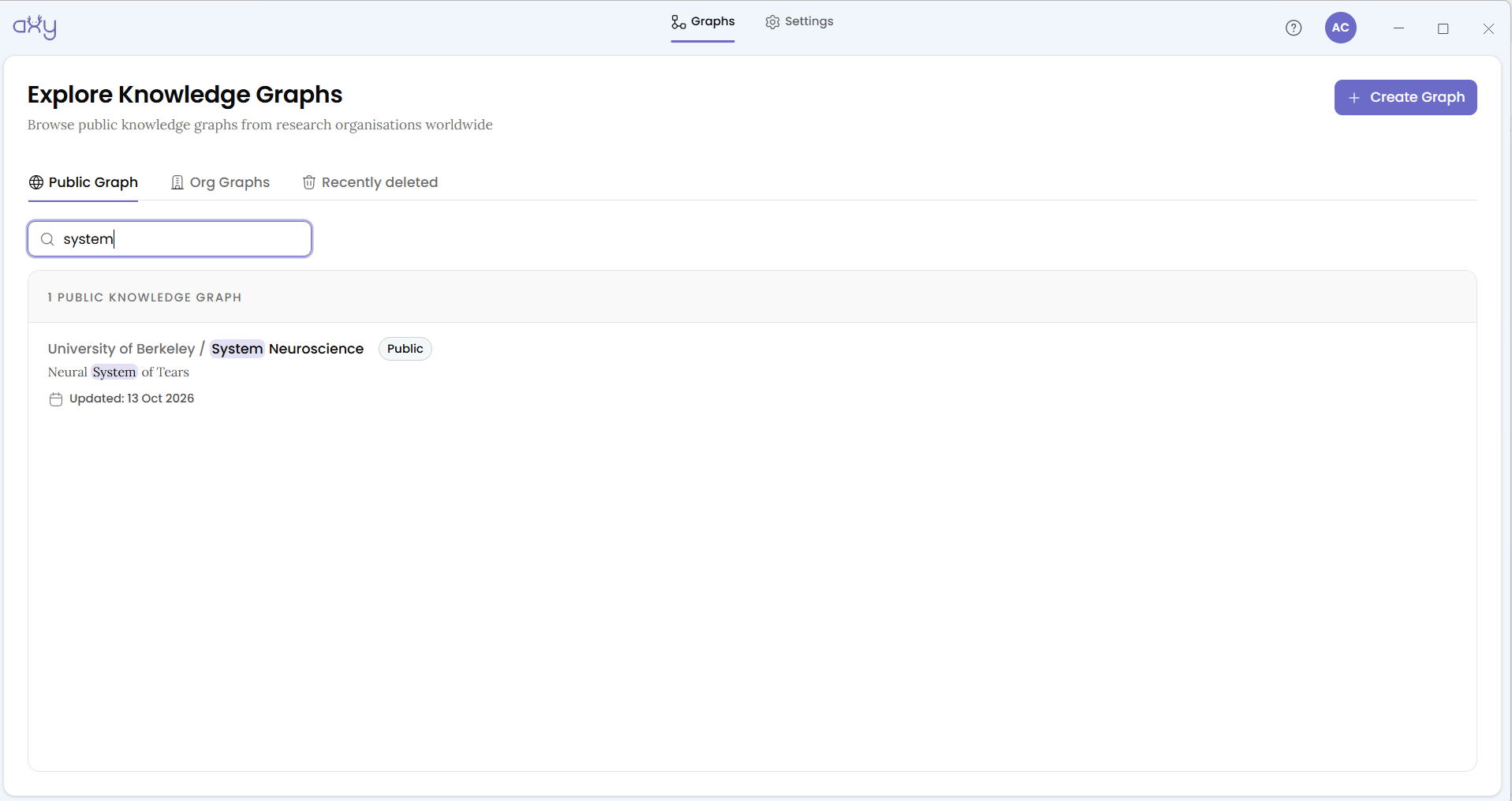
Once you’ve chosen the graph’s visibility, configure its vocabulary.
Start with a few Node types and Edge types that reflect how your club already talks about the subject. Node types represent the things your team discusses, and Edge types describe the relationships or claims connecting them. You can add more as your graph grows.
For a detailed walkthrough, see Configure Your Knowledge Graph.
Members sign up and onboard independently. Nobody gets invited. You can share the download page and the graph’s name. Sign-up asks each person to create an organisation of their own, which is separate from the journal club’s graph and doesn’t prevent them from accessing it.
With the graph ready, you’re set to try the workflow with a single paper.
Draft the session paper beforehand
This is the presenter’s job, and it should take less time than making the slides.
Open the club graph and switch the Graph tab’s toggle from Discover to Build. The task is to represent the paper’s central findings as relationships between nodes. Rather than summarising every figure, supplementary result and experimental detail, focus on three to six findings that the paper is actually about.
The aim is to give the room a focused contribution it can evaluate during the discussion.
Reuse nodes that are already in the graph. If week three’s paper was about concept A (say, tear secretion) and this week’s paper says something new about it, connect to the existing node rather than making a new one. Reuse is what ties this week to earlier weeks. Without it, you’d have a pile of disconnected summaries.
Two fields deserve particular attention when adding each relationship:
- Evidenced by: enter this week’s paper DOI. Type it into the field (placeholder “Enter name or DOI ID”). The first time a paper is used, the badge reads Will be added to registry on save. This links the contribution to its supporting paper and builds the club’s Paper Registry over time.
- Confidence: use the slider from 0.00 to 1.00 to record the presenter’s initial assessment of how well the paper supports the claim.
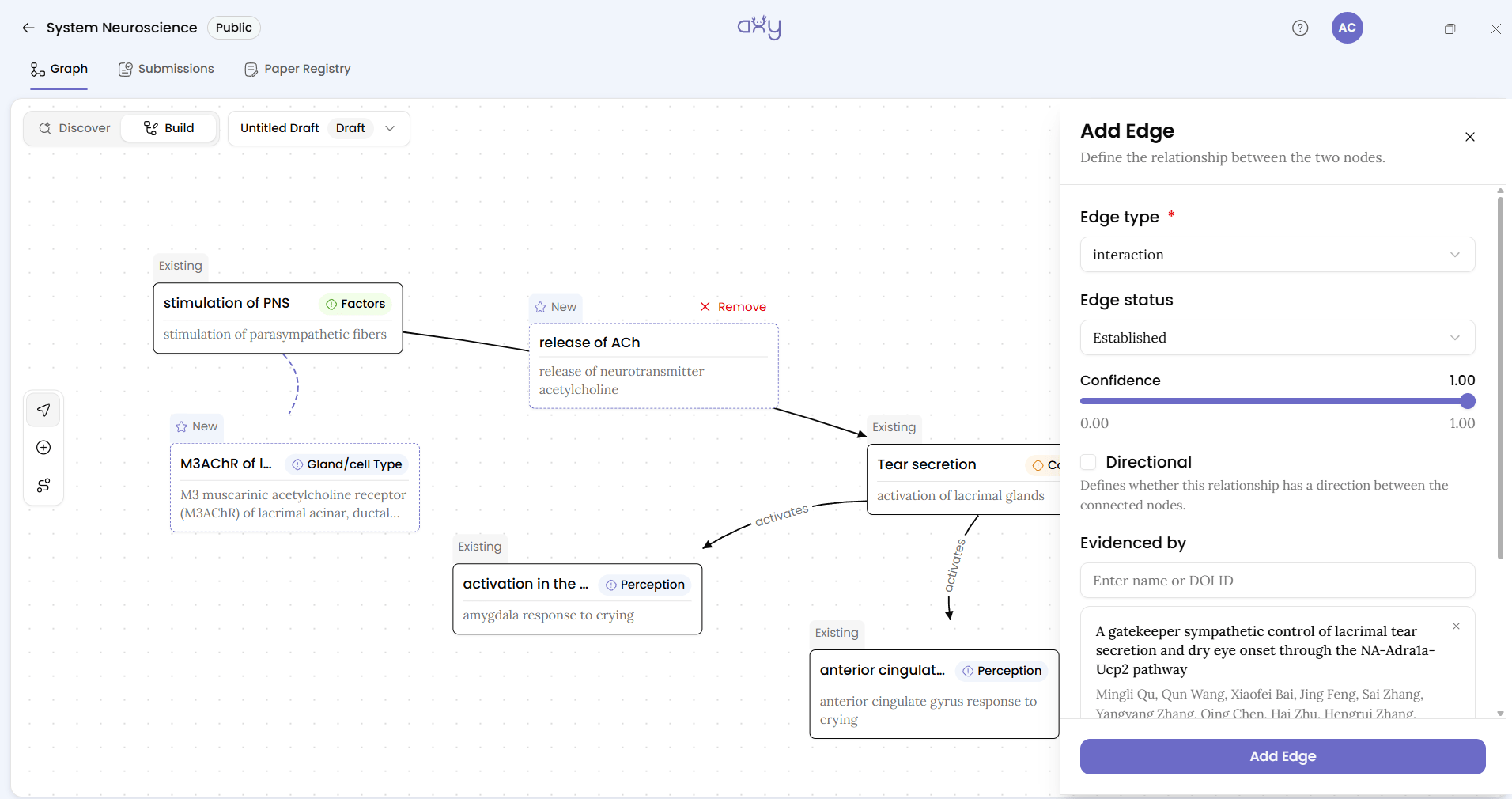
This isn’t the club’s final verdict. It’s a starting point that makes the presenter’s interpretation explicit before others weigh in.
Every contribution you make is saved automatically to Your Drafts in the dropdown and stays private until submitted. When the draft is ready, click Submit. The dialog warns: “Once submitted, this goes to reviewers and leaves your drafts list.” The submission now sits under Submissions → Open, where the organiser and the rest of the club can find it.
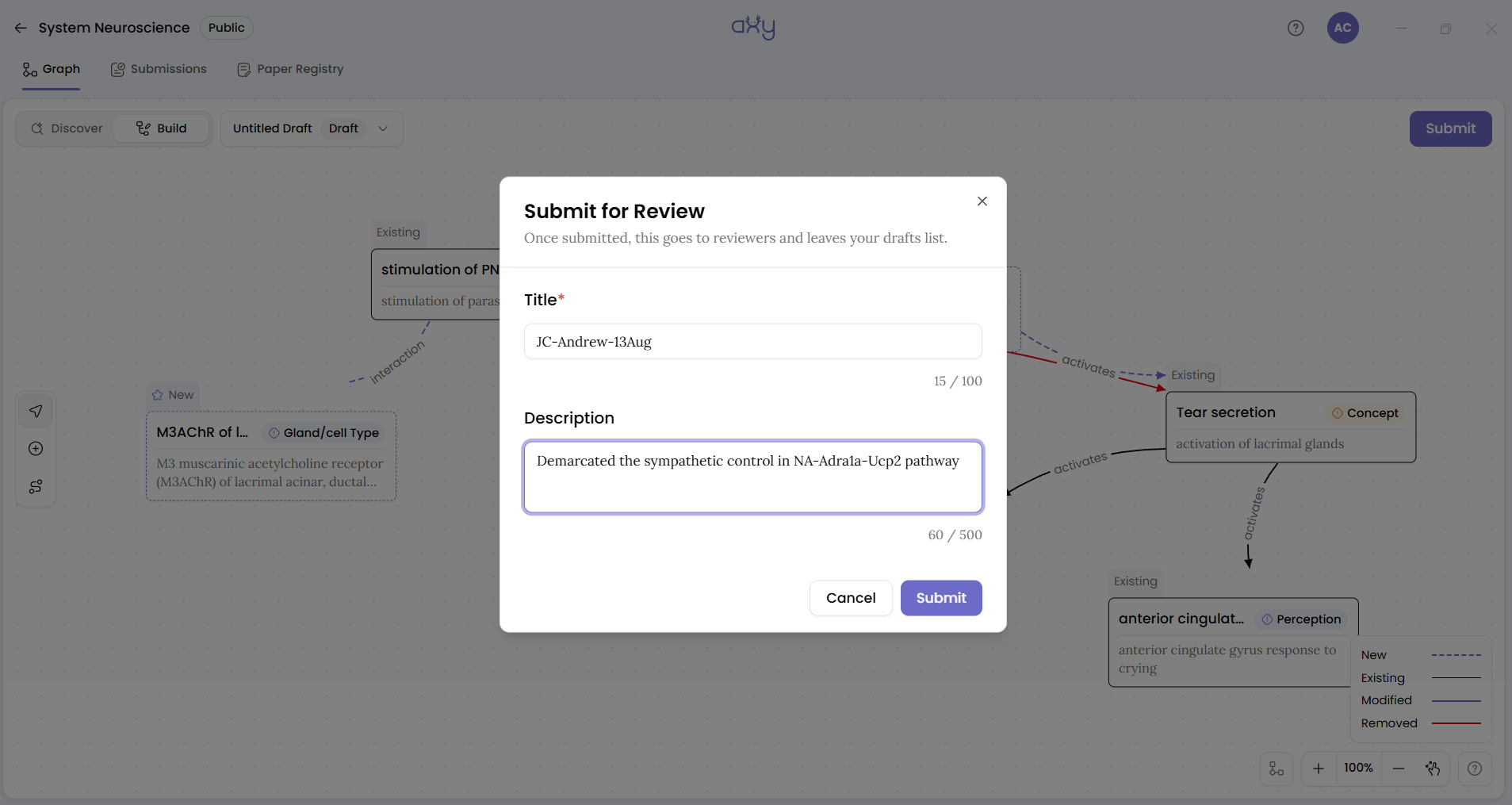
Review: in the session
This is where the workflow becomes more than a paper presentation. The organiser opens the submission and puts its Submission Graph into Full screen view on the projector.
That view shows exactly what this paper would add to what the club already holds: the new nodes, the new edges, and how they attach to nodes from earlier weeks. It gives the room something specific to argue about. Instead of asking “what did we think of the paper?”, people ask “should this edge be in our graph, and at what confidence?”
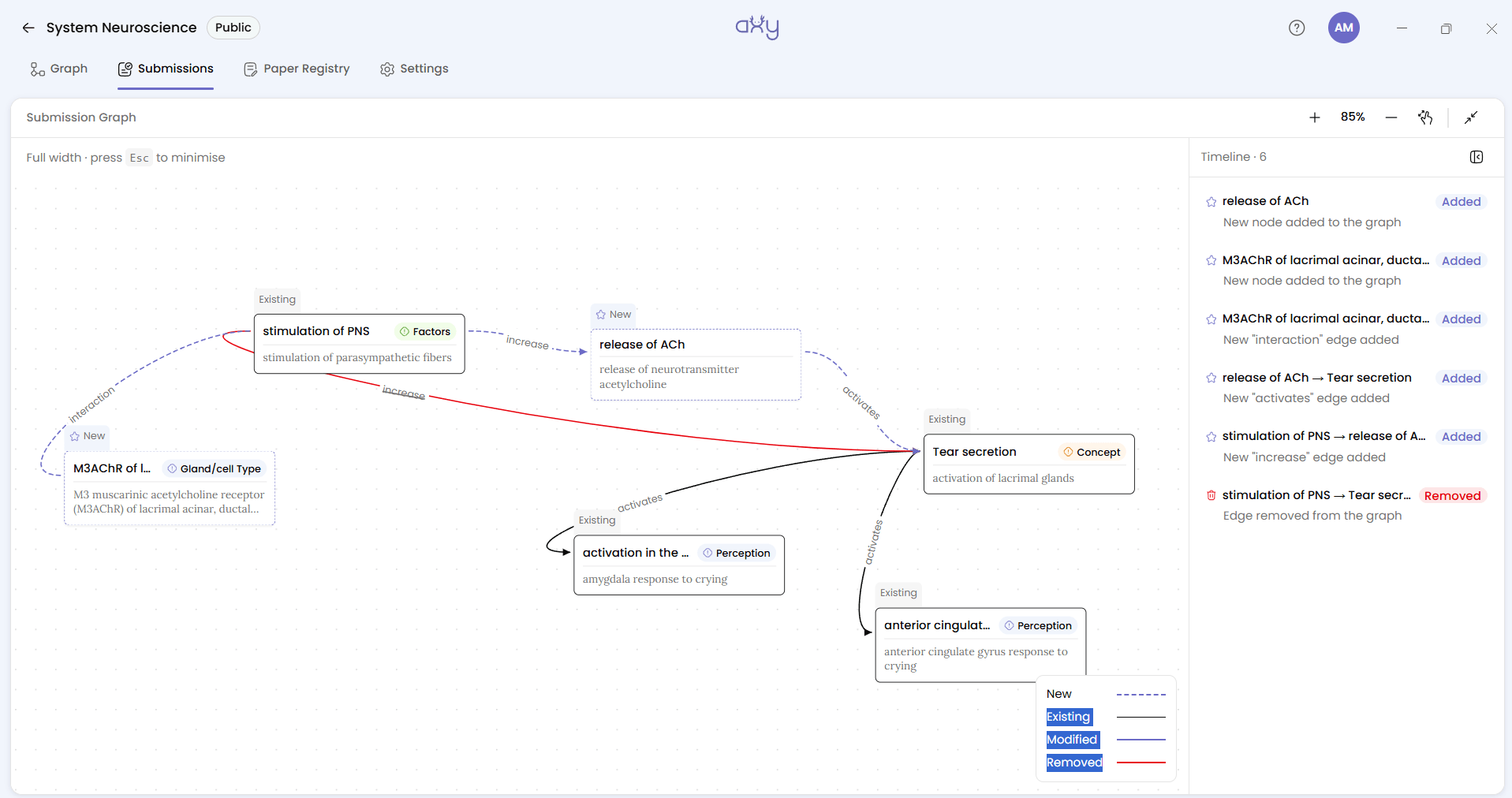
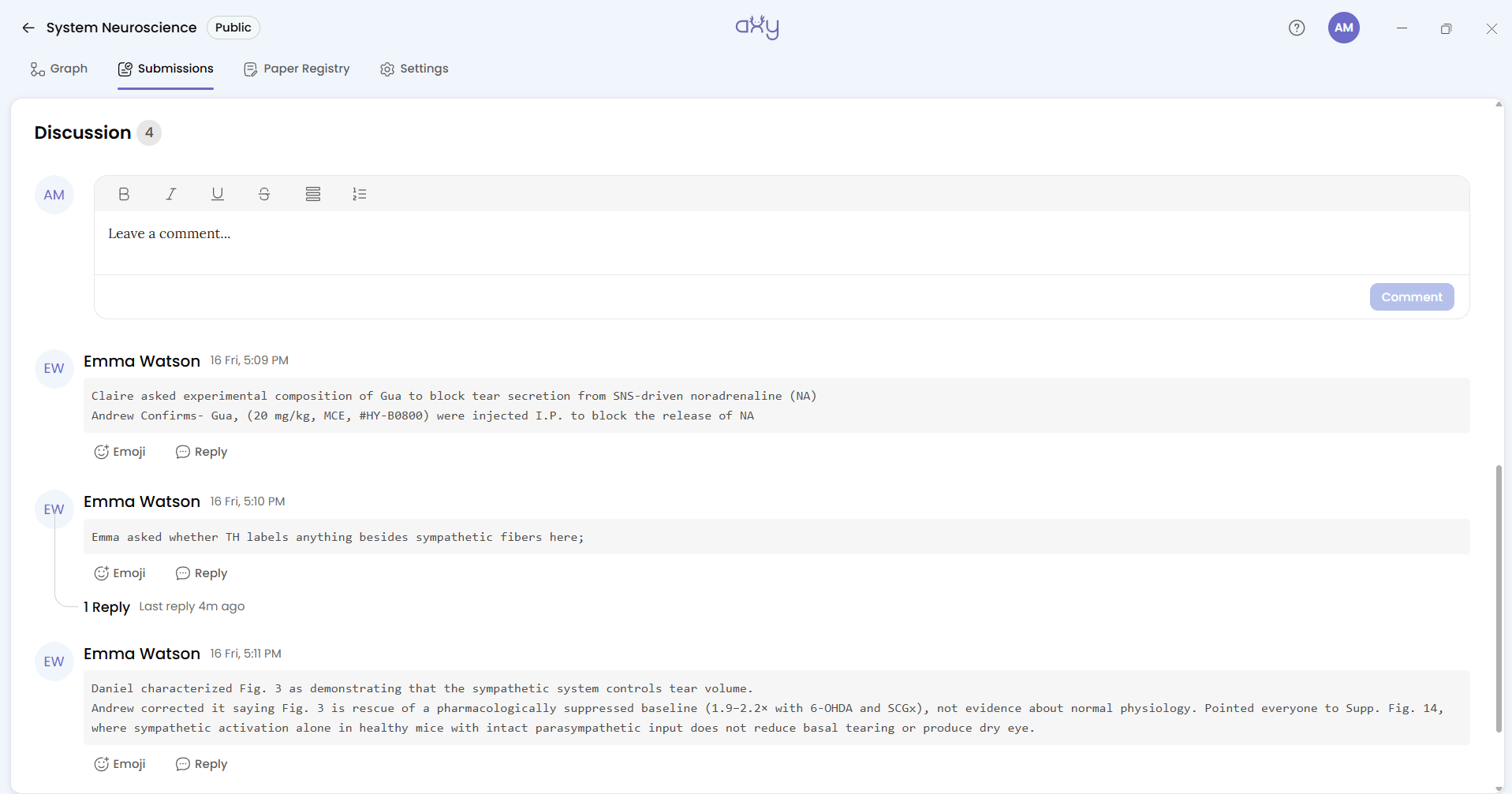
One person records the room, live, in the Discussion thread. That’s either the organiser or a scribe on the rota. Note the objections, the caveats, and the points where someone said “that’s not what Figure 3 shows”. Use Reply to keep a point and its rebuttal together.
This rule is what keeps the workflow going past week three. Don’t ask everyone to write up their thoughts afterwards. One PI tried setting up an online forum for his journal club, and it got one comment: his own (Filion, 2022). One presenter drafts, one person records, and nobody else has homework.
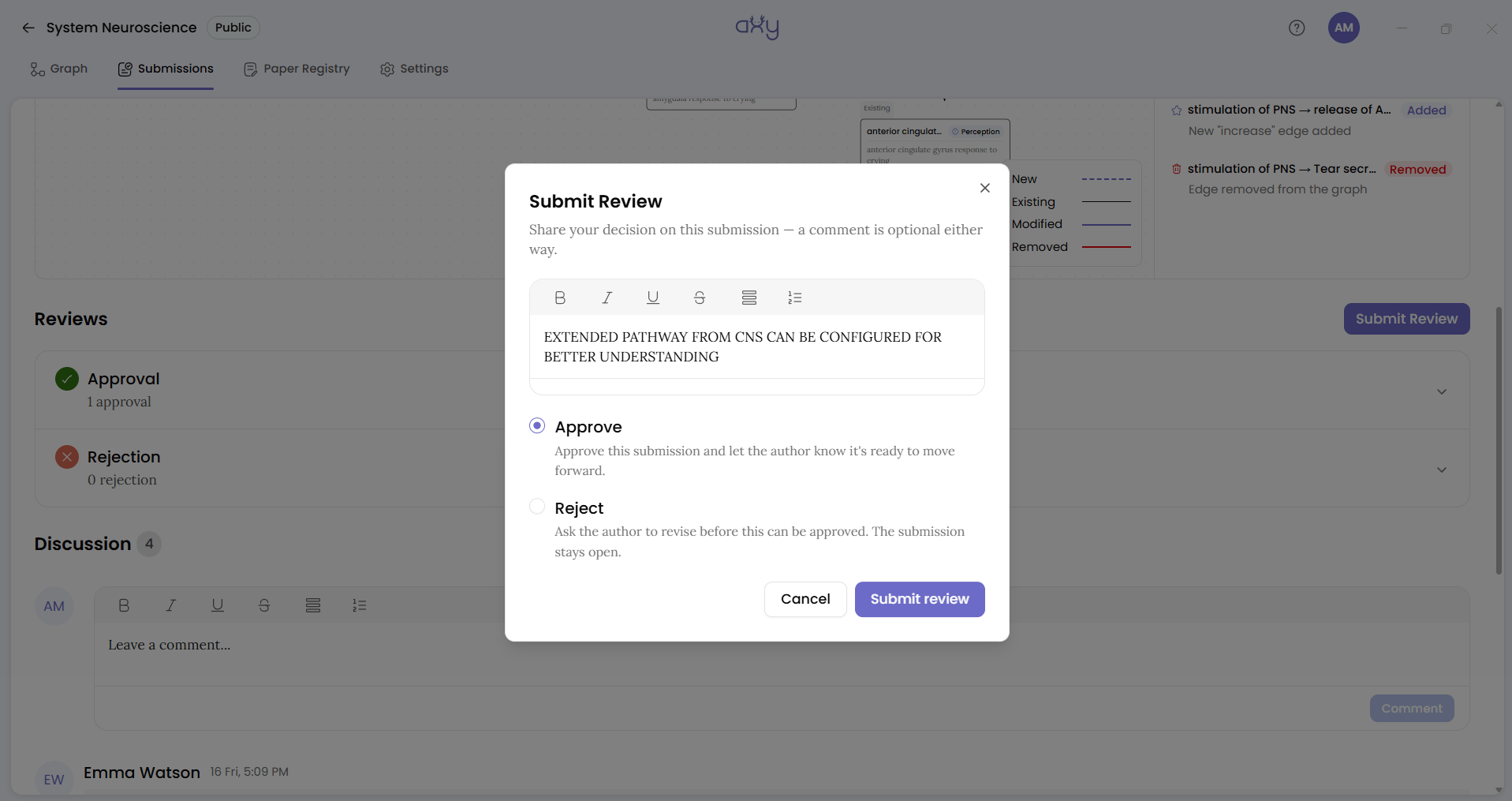
Then members review. Each club member clicks Submit Review and chooses Approve or Reject. A rejection reads “Ask the author to revise before this can be approved. The submission stays open.” In practice it means “not as written”.
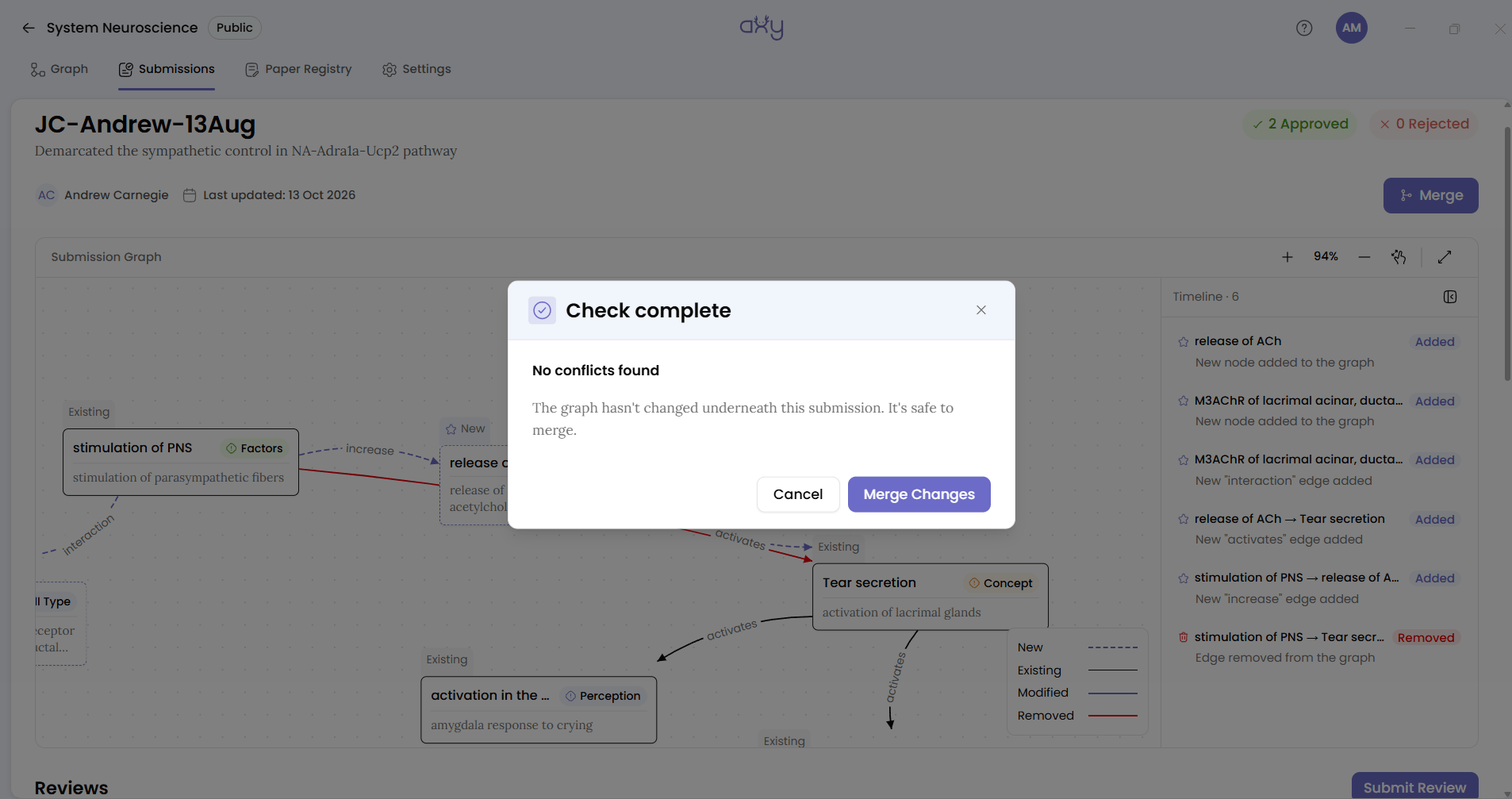
If the room pushes back, the presenter uses Convert to Draft, lowers a confidence or drops the finding the room didn’t accept, and resubmits. Then the organiser merges, and the paper’s findings become part of the club’s graph.
Review and revise the contribution when needed
How To Work On Axy As A Team covers each of these in detail. For a journal club, they mean:
- The presenter can’t review their own submission. The button is disabled: “You can’t review your own submission.” The review has to come from the room.
- Merging doesn’t wait for approvals. The organiser can merge at any time. Your club decides its own rule (two approvals, say, or a show of hands) and the organiser follows it.
- Nobody gets notified. Axy sends no emails and no alerts. Keep the reminder email you already send.
The club’s verdict stays recorded
The room’s decision is stored on each edge, as its Confidence and its Edge status. On the Discover canvas, confidence shows as Low, Medium or High.
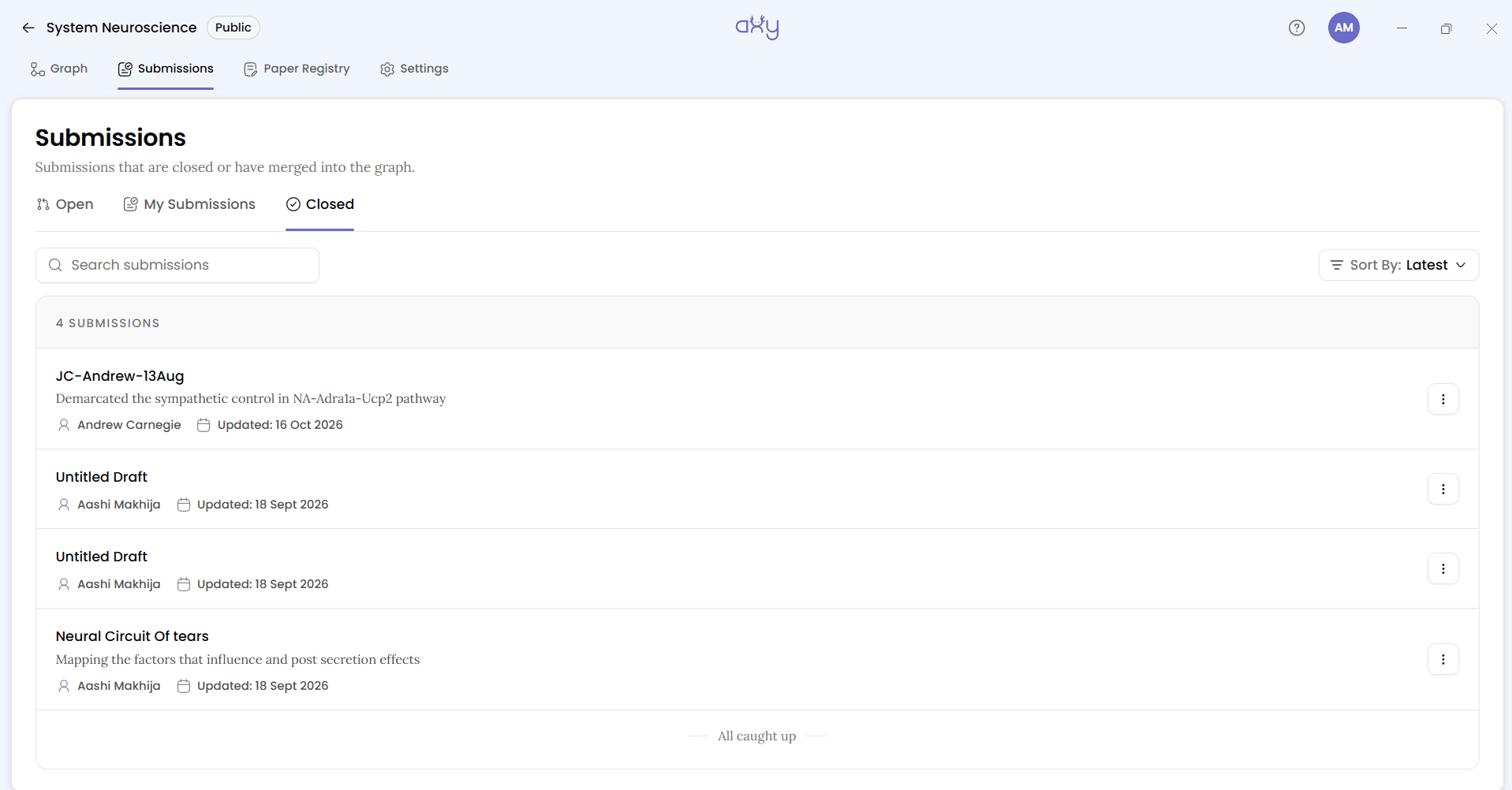
The reasons are stored in the Discussion on the merged submission, which stays readable under Submissions → Closed. That’s the only record of why a finding is in the graph. There’s no per-node history, so the scribe’s notes are what a new member will read a year from now. Write them with that reader in mind.
Present: the graph on Discover
After the first few weeks, the graph starts to pay off. At the start of the next session, open the Discover canvas and look at the week’s subject in the context of everything the club has read.
Imagine that this week’s paper proposes that Node A drives Node B, while a paper from six weeks ago suggests the opposite. Rather than relying on someone to remember the earlier discussion, you can explore both relationships on the canvas and compare the confidence the group assigned to each.
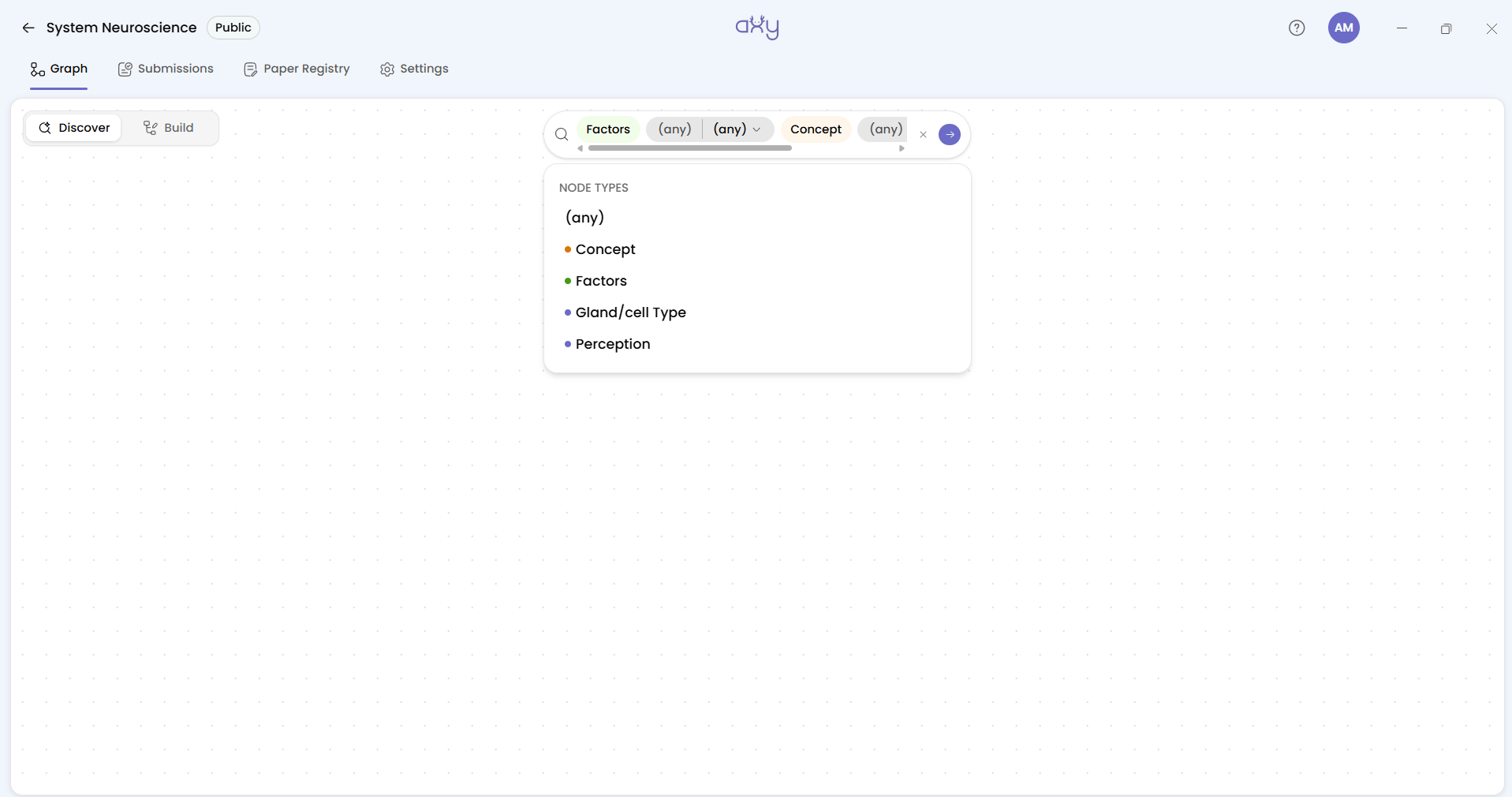
Three tools help you read it:
- Legends colours nodes by type and edges by confidence: Low (<34%), Medium (34–67%), High (≥67%). Open it on Confidence and the room’s past verdicts are visible at a glance.
- Card list shows the same result as a searchable list, which is easier to read on a projector than a dense canvas.
- The layout picker rearranges the canvas: Force-directed (cose), Tree, Concentric rings, Circle or Grid.
A Discover canvas isn’t saved when you leave it, so set it up at the start of each session. It takes about a minute.
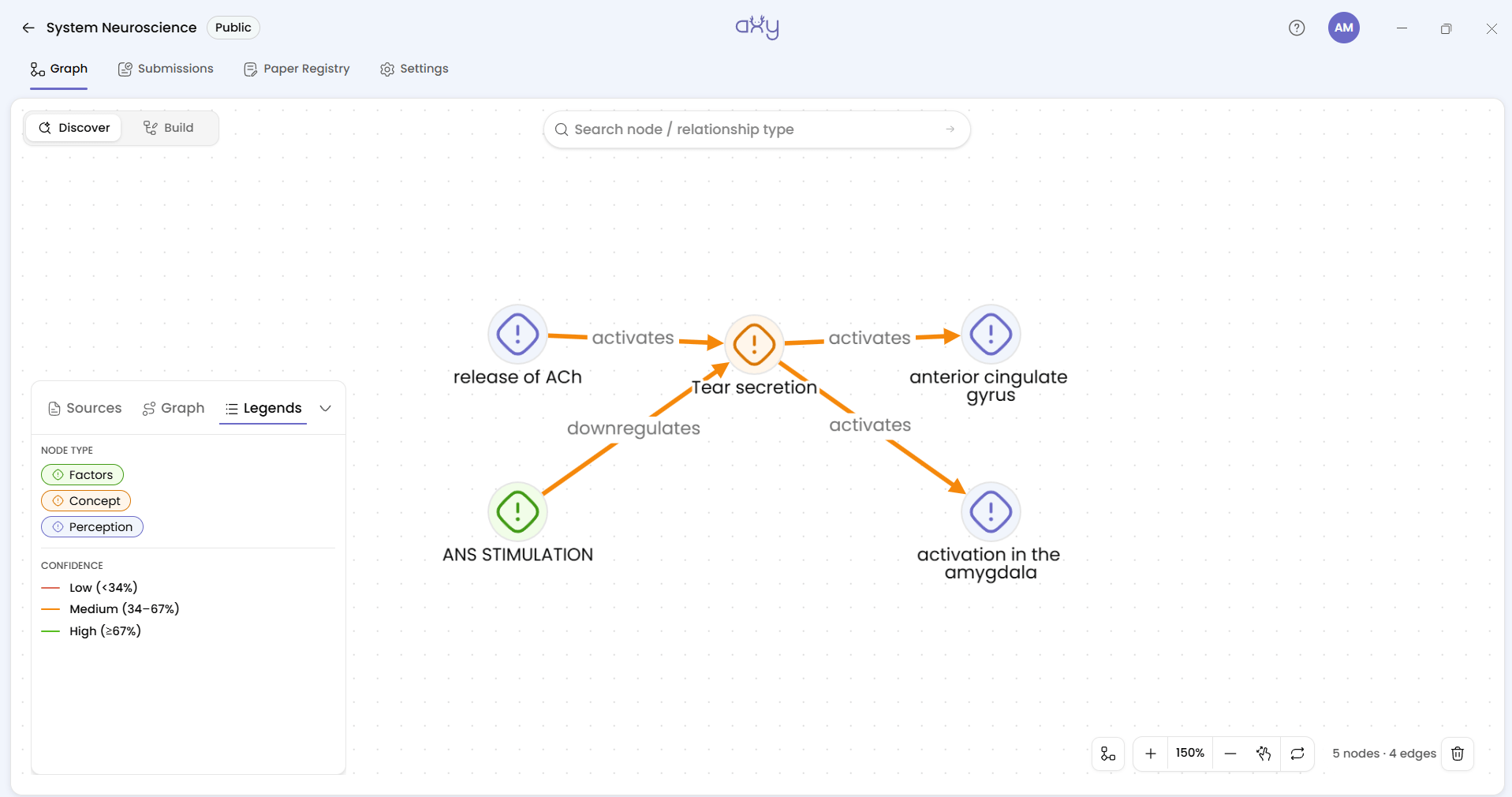
New members get up to speed easily
Every research group takes in new people: rotation students, PhD candidates, postdocs, and researchers joining an ongoing project.
A journal club knowledge graph gives them three places to start:
- Paper Registry. A searchable list of every paper the club has read, filtered by title and year. It’s the list your shared doc used to hold.
- Discover. How those papers and their findings connect, and what the club concluded about each connection.
- Submissions → Closed. Every paper the club has merged, with the room’s Discussion beside it. This is where the reasoning lives.
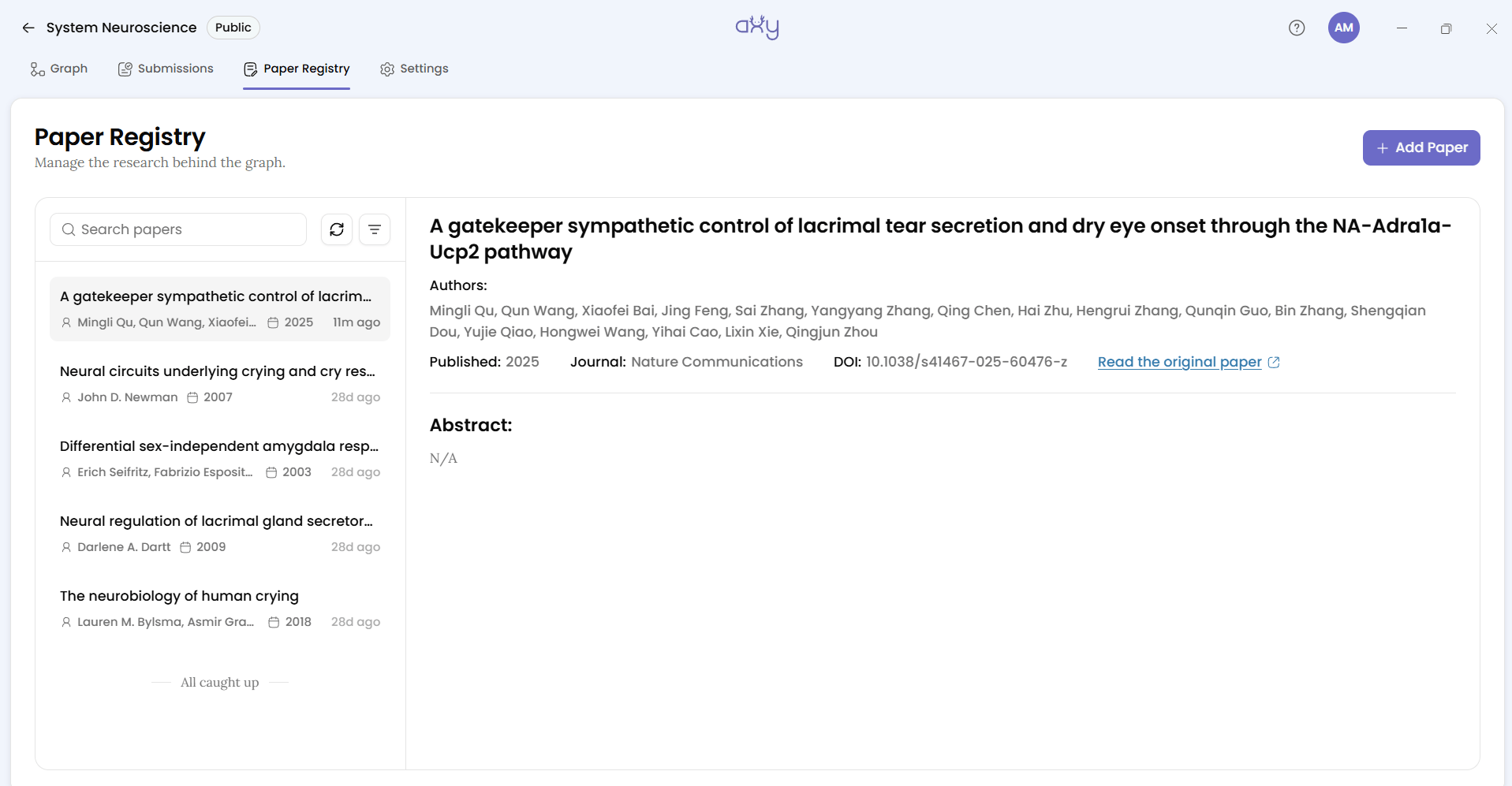
Together, these provide more than a list of papers to read. They give newcomers a route into the questions the lab has explored, the relationships it has considered, and the decisions it has made.
New members still need an Axy account to access the graph. Share the download page before directing them to these resources.
Know what the graph doesn’t do
Know the limits of a tool before you commit a semester to it.
- It isn’t a reference manager. It holds no PDFs and has no import, annotation or citations, so keep Zotero.
- A Discover canvas can’t be saved or shared. You rebuild it each session.
- Full screen presentation exists only on the Submission Graph, not on Discover. This is why the projector moment comes during review rather than in Present.
- An Axy account is mandatory to read the graph. There’s no share link, embed or export for people without one.
- You can’t comment on a node or an edge directly. Discussion happens on submissions only.
- There are no notifications, so your reminder email keeps its job.
And Axy won’t solve every reason a journal club struggles. Attendance, preparation and a clear purpose still matter. What it addresses is more specific: the loss of what a group concludes after it has finished discussing a paper.
Run next week’s paper through Axy
You don’t have to commit to or redesign the whole semester. Try one paper:
- Download Axy and make one public graph for your club.
- Ask next week’s presenter to draft three to six findings from their paper before the session.
- During the session, put the Submission Graph on the projector and assign someone to record the room’s reasoning.
If you find the session helpful, run the upcoming papers through the same graph. By the end of a term, you’ll have a resource that shows what the club concluded, how those conclusions connect, and why the group reached them.
Your journal club already generates scientific insight. Keep every minute of it.
'%3e%3cpath%20fill-rule='evenodd'%20clip-rule='evenodd'%20d='M120%20296L120%20280.035L120%20189.742L120%20120L356.293%20120H429.082L470%20120L470%20296L325.583%20296C298.92%20308.779%20268.624%20316%20236.5%20316C204.376%20316%20174.08%20308.779%20147.417%20296L120%20296Z'%20fill='%23B6C1EB'/%3e%3c/g%3e%3cg%20id='Ellipse%20142'%20filter='url(%23filter1_f_0_8)'%3e%3cpath%20fill-rule='evenodd'%20clip-rule='evenodd'%20d='M147.417%20296C137.774%20291.379%20128.607%20286.031%20120%20280.035L120%20189.742L120%20120L356.293%20120L429.082%20120C429.689%20125.758%20430%20131.595%20430%20137.5C430%20206.449%20387.622%20266.268%20325.584%20296C298.92%20308.779%20268.624%20316%20236.5%20316C204.376%20316%20174.08%20308.779%20147.417%20296Z'%20fill='%23FFFFE6'/%3e%3c/g%3e%3cg%20id='Ellipse%20143'%20filter='url(%23filter2_f_0_8)'%3e%3cpath%20fill-rule='evenodd'%20clip-rule='evenodd'%20d='M120%20189.742C141.632%20225.693%20183.01%20250%20230.5%20250C300.364%20250%20357%20197.394%20357%20132.5C357%20128.278%20356.76%20124.107%20356.293%20120L120%20120L120%20189.742Z'%20fill='white'/%3e%3c/g%3e%3c/g%3e%3cdefs%3e%3cfilter%20id='filter0_f_0_8'%20x='-6.38111e-08'%20y='4.01978e-08'%20width='590'%20height='436'%20filterUnits='userSpaceOnUse'%20color-interpolation-filters='sRGB'%3e%3cfeFlood%20flood-opacity='0'%20result='BackgroundImageFix'/%3e%3cfeBlend%20mode='normal'%20in='SourceGraphic'%20in2='BackgroundImageFix'%20result='shape'/%3e%3cfeGaussianBlur%20stdDeviation='60'%20result='effect1_foregroundBlur_0_8'/%3e%3c/filter%3e%3cfilter%20id='filter1_f_0_8'%20x='20'%20y='20.0001'%20width='510'%20height='396'%20filterUnits='userSpaceOnUse'%20color-interpolation-filters='sRGB'%3e%3cfeFlood%20flood-opacity='0'%20result='BackgroundImageFix'/%3e%3cfeBlend%20mode='normal'%20in='SourceGraphic'%20in2='BackgroundImageFix'%20result='shape'/%3e%3cfeGaussianBlur%20stdDeviation='50'%20result='effect1_foregroundBlur_0_8'/%3e%3c/filter%3e%3cfilter%20id='filter2_f_0_8'%20x='20'%20y='20.0002'%20width='437'%20height='330'%20filterUnits='userSpaceOnUse'%20color-interpolation-filters='sRGB'%3e%3cfeFlood%20flood-opacity='0'%20result='BackgroundImageFix'/%3e%3cfeBlend%20mode='normal'%20in='SourceGraphic'%20in2='BackgroundImageFix'%20result='shape'/%3e%3cfeGaussianBlur%20stdDeviation='50'%20result='effect1_foregroundBlur_0_8'/%3e%3c/filter%3e%3c/defs%3e%3c/svg%3e)


